LinkedIn resource
How to Download Your LinkedIn Account Data
A LinkedIn data export can contain selected categories such as connections or messages, or the larger account archive. Both options start under Data Privacy and Get a copy of your data.
The decision that matters
Choose the right export before you start
LinkedIn's delivery time depends on the scope you select. Specific categories can arrive quickly, while the larger archive takes longer, so choose only the data needed for the task.
Current workflow
How to complete the current provider export
-
On LinkedIn on the web, select Me → Settings & Privacy.
Open the first-party step -
Open Data Privacy in the left rail.
Open the first-party step -
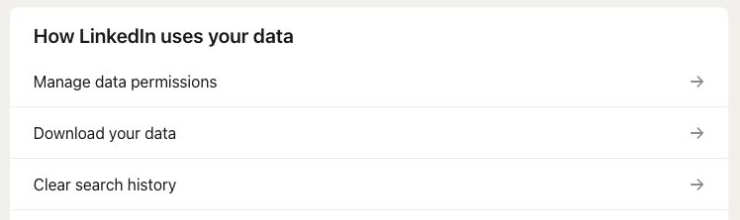
Under How LinkedIn uses your data, open Get a copy of your data.
Open the first-party step -
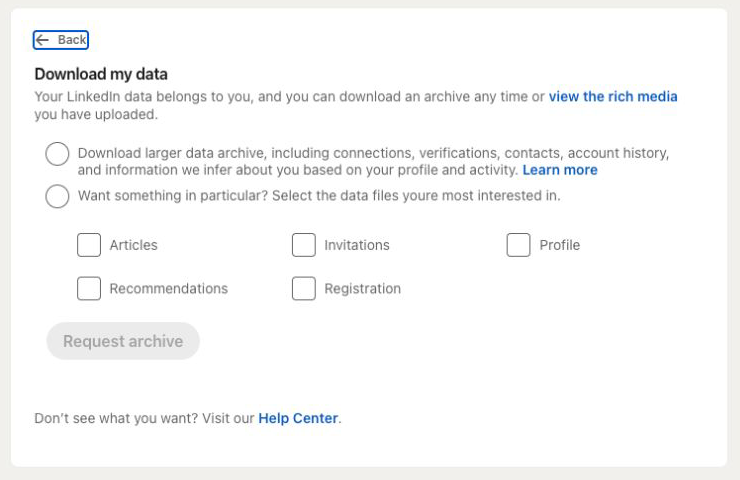
On Download my data, choose specific categories or the larger data archive.
Open the first-party step -
Click Request archive.
Open the first-party step -
LinkedIn emails specific categories within minutes and the larger archive within 24 hours.
Open the first-party step -
Use the email link to download the archive within 72 hours.
Open the first-party step
Reviewed visual references
Match the current first-party screens
What this workflow covers
Useful output and next steps
- Opening Get a copy of your data from Data Privacy
- Choosing specific categories or the larger data archive
- Requesting the archive and using the emailed download link
Objections and limits
What this resource does not promise
- Specific categories may arrive within minutes, while the larger archive can take up to 24 hours.
- The emailed download link is available for 72 hours.
- Download Your Data does not currently analyze LinkedIn archives.
Repository evidence
Current in-product visual guide route
#guide/linkedinThis exact route or input shape is maintained in frontend/application/routing.js.
First-party sources
Verify the provider workflow
Questions before you export
Frequently asked questions
Can I download only LinkedIn connections or messages?
Yes. The current Download my data screen lets you choose specific categories instead of requesting the larger archive.
How long does a LinkedIn data export take?
LinkedIn says specific categories can arrive within minutes and the larger archive within 24 hours.
How long does the LinkedIn download link work?
The current guide says to use the emailed archive link within 72 hours.
Continue with the right provider